

How does the surface sensor calibrator control system operate?
The Control system can automatically connect to the Surface sensor calibrator, monitor the data of the surface calibrator in real time and control the Surface sensor calibrator.
The Surface sensor calibrator Control System supports the following functions:
1. Display and refresh the device PV value in real time.
2. Display the device Sv value and set the device Sv value.
3. Automatically calculate and display the 10-minute fluctuation of the equipment.
4. Start/stop Surface calibrator temperature control.
5. Start/stop Surface calibrator autotune.
6. Display the surface probe calibrator curve in real time, and support zooming and panning functions.
System Configuration
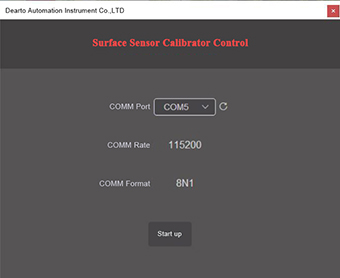
? After the system starts, enter the Surface sensor calibrator control configuration interface.
? In the configuration interface, select the communication port of the surface probe calibrator device according to the serial port connection.
? The communication rate of the surface calibrator is 115200, and the communication format of the surface probe calibrator is 8N1, which does not need to be modified.
? Click the start button, the system will automatically connect to the Surface sensor calibrator.
Surface sensor calibrator connection
? The system enters the Surface sensor calibrator connection interface and starts online inspection of surface calibrator equipment.
? If the serial port of the surface probe calibrator program is occupied, it will return to the configuration interface, and an error message of "communication port is occupied" will be prompted.
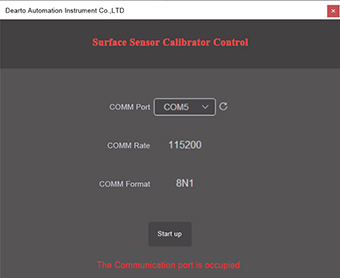
If the Surface sensor calibrator program does not respond, it will return to the configuration interface and prompt the error message "Surface calibrator does not respond".
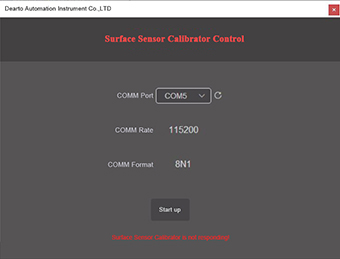
If the Surface sensor calibrator program connection is successful, it will enter the monitoring main interface.
Monitoring main interface
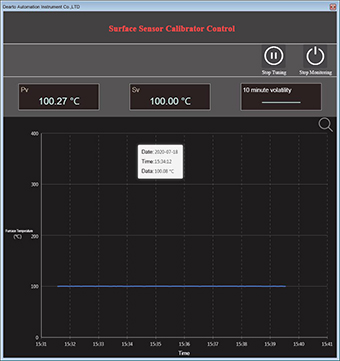
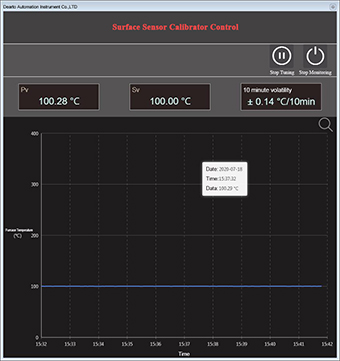
? After the system enters the monitoring main interface, it will display Pv value, Sv value, 10-minute fluctuation and record curve information.
? The system collects Pv value data in real time and refreshes it in real time on the main interface.
? The system displays the current Sv value, and the Sv value can be modified by setting the temperature button.
? When the system starts 10 minutes later, it starts to display the 10-minute fluctuation of the surface probe calibrator. If the system startup time is less than 10 minutes, it will display --.
? The system collects data every 5s, and adds the data to the historical record. The 10-minute fluctuation data is obtained by calculating the historical record data. After the historical record data is added, it will be displayed in the historical record curve in real time.
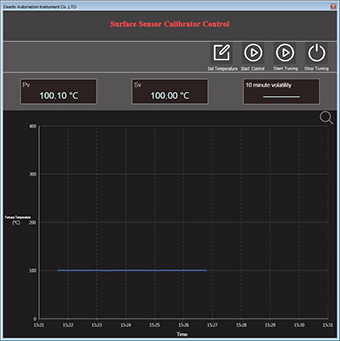
Record curve
The temperature curve of the last 10 minutes is displayed in real time in the record curve. When new data is added to the history record, the record curve will be refreshed in real time.
? In the record curve, click the enter interactive mode button on the upper right to enter the record curve interactive mode. In the interactive mode, the record curve can be zoomed in, zoomed out, panned, displayed all data, refreshed data, and displayed/hidden prompt information.
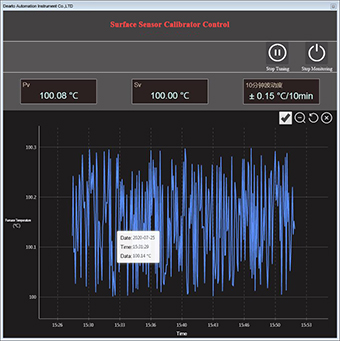
? Curve zoom in and zoom out: In the interactive mode, scroll the mouse wheel up to zoom out the curve. Roll the wheel down to zoom in on the curve.
? Curve translation: In interactive mode, hold down the left mouse button and drag to perform curve translation.
? Show All: In the interactive mode, click the Show All button to automatically zoom the curve to ensure that all data can be displayed correctly in the chart.
? Refresh chart: In the interactive mode, click Refresh Chart, and the system will refresh the data to ensure that the newly collected data can be displayed correctly.
? Show/Hide Prompt Information: In interactive mode, uncheck the "Show Prompt Information" check box, and the prompt information of each data collection point will no longer be displayed. Select the "Show Prompt Information" check box, and when you move the mouse, it will automatically prompt the collection date, collection time and data value of the latest collection point.
Surface sensor calibrator Control
? Surface probe calibrator control operation support: start/stop temperature control, start/stop setting, modify set value Sv.
? Start/stop temperature control: Click the start temperature control button, and the system enters the temperature control mode. In the temperature control mode, only the operation of stopping the temperature control can be performed, and other verification furnace control operations cannot be performed. Click the stop temperature control button to pop up a confirmation dialog box for stopping temperature control, click OK to exit the temperature control mode.
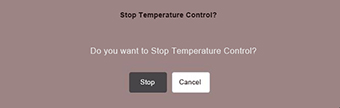
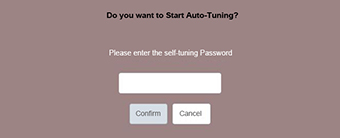
Start/stop tuning: Click the start tuning button, the system will pop up a confirmation dialog box, enter the self-tuning password to enter the self-tuning mode. In the self-tuning mode, only the operation of stopping the self-tuning can be performed, and other verification furnace control operations cannot be performed. Click the stop tuning button to exit the auto-tuning mode.
Note: Please use the self-tuning function after consulting the manufacturer.

Modify the set value Sv: click the set temperature button, a dialog box for modifying the set temperature will pop up, modify the set temperature value, and click the set button to modify the set temperature of the surface probe calibrator.
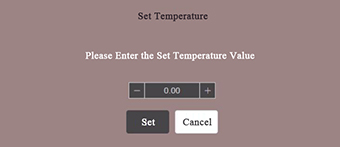
Note: When the system is in the temperature control mode/setting mode, the set value Sv cannot be modified, it must be modified after the temperature control/auto-tuning is stopped.
Stop monitoring: click the stop monitoring button, a dialog box of stopping monitoring will pop up, click stop, and the system will exit the monitoring interface.

| Previous:The difference between liquid calibration bath and dry block calibrator | next:Invitation: Join Us at World Metrology Day 2026 Conference in Singapore |
 Tel
Tel
 Product
 Contact
 Home
Home